 TrueOffset
For timekeepers · iPhone · iPad · Mac
An offset is easy. Knowing how far to trust it is the work.
TrueOffset is an NTP client that shows its working: the round trip beside every offset, the server's own claims beside what was measured, and the device's clock taken out of the comparison. On the Mac it also reads what your own time servers record about themselves, and charts it in the manner of NTPsec's ntpviz.
Download on the App StoreFree · iOS and iPadOS 17.6 · macOS 15 · tvOS 26.2, or later
How it measures
Each exchange takes the four timestamps of RFC 5905: offset ((T2 − T1) + (T3 − T4)) / 2, server minus device, and delay (T4 − T1) − (T3 − T2). Half the round trip is the hard bound on what asymmetry can do to one exchange, and the app shows it beside every offset. A constant asymmetry stays invisible from one vantage point however long you measure.
- Your servers are measured in bursts of four, and the app keeps the exchange with the shortest round trip. On the Mac, every 5 seconds to every 5 minutes.
- Public servers get one request per poll and no more than one a minute, well inside NIST's rule of no more than once every 4 seconds.
- The whole reply is shown: stratum, reference ID (over IPv6 a hash, as RFC 5905 has it), root delay, root dispersion, root distance, precision, leap indicator, version. The app treats a stratum 0 reply as a kiss-o'-death, a server telling the client to stop or slow down, and reads its reference ID as the four-letter code, such as RATE or DENY. It treats stratum 16 as unsynchronized.
- Notable servers are marked for IPv6, NTS, leap smearing, and restricted access, so a smearing server isn't mistaken for a broken one.
- NTS on the Mac. Turn on Network Time Security for a server, and the Mac checks its certificate, counts only authenticated replies, and never falls back to plain NTP for it. A server's page shows the certificate and why a key exchange failed, if one did. NTS proves who answered, not that the path is short. The iPhone, iPad, and Apple TV apps measure with plain NTP.
- IPv4 against IPv6: one name measured over both families, side by side, to catch two different machines behind one name.
- It never sets the clock. It measures and reports, on every platform.
Taking the device out of it
From a phone on Wi-Fi, almost all of a measured offset is the phone and the network. So the app compares servers with one another.
A server as the zero
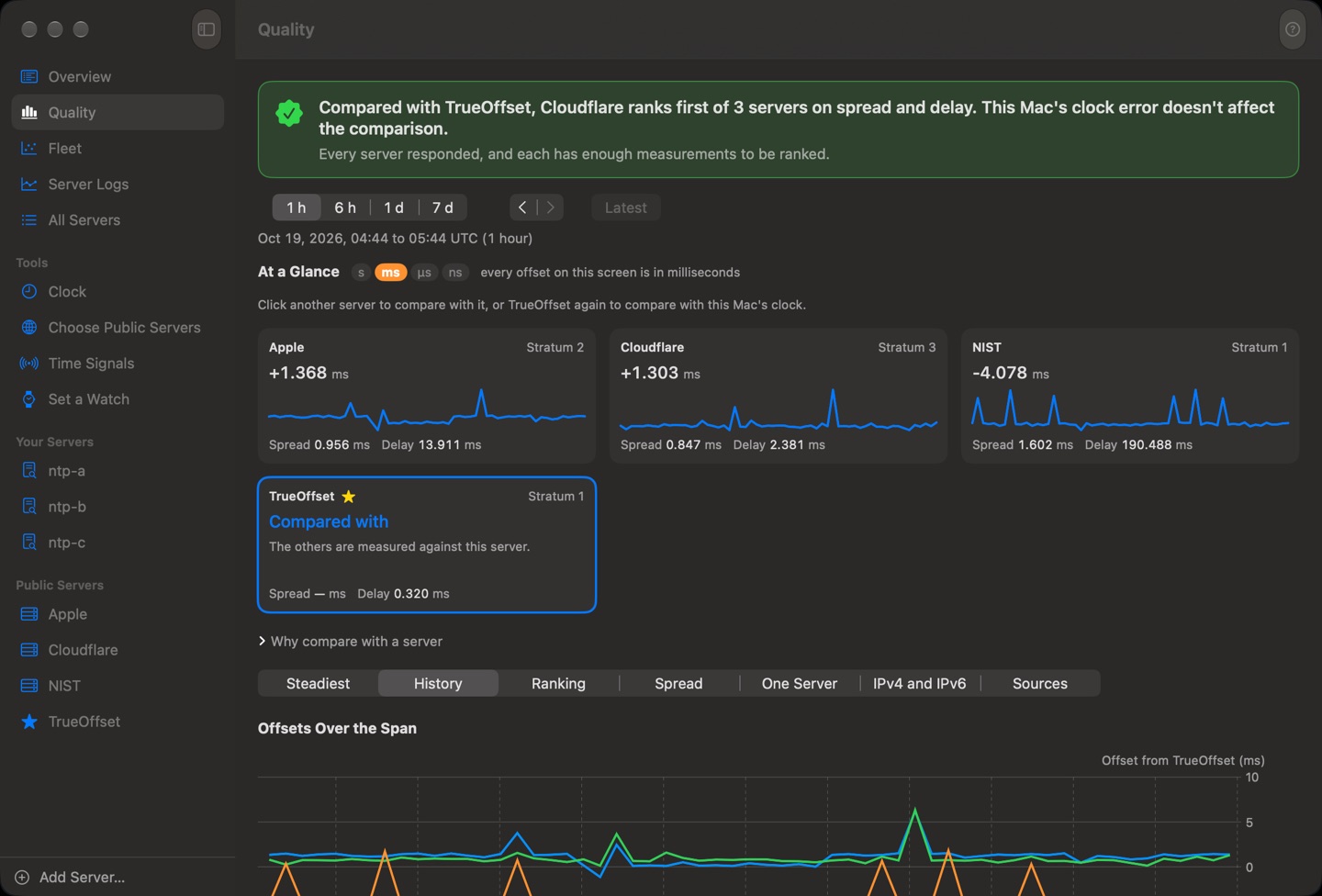
On the Mac, set the Quality screen to compare against a server instead of the device. The app subtracts that server's offset at the same moment from each of the others, the device clock cancels, and what is left is how far the servers disagree.
The three-cornered hat
With three or more servers compared in every pair, each one's own share of the unsteadiness is separated out. On the Mac's Quality screen, and on the iPhone's ranking.
“Answering as one server”
When three or more servers, over one address family, reply with identical stratum, precision, reference, root delay, and root dispersion, the Mac says your network is answering for them. Each family is judged apart.
The time trail
From the Mac to the server, to the server it follows, to the reference clock, with the uncertainty added at each step.
Every figure, over time
History on one scale, histograms, spread, delay against offset (the cloud narrows toward the fast exchanges), sources, and a ranking: the spread (σ) of its offsets in milliseconds plus a tenth of its best round trip in milliseconds. Lower is better. It says how a server looks from where you are, not how good it is.
Around the clock on the Mac
Measuring from the menu bar, history kept from 30 days to forever, notifications on a server going quiet or changing its source, and a log of stratum, reference, and address changes beside the Mac's own sleeps, wakes, network changes, and clock steps.
Mac
Server Logs: what your server says about itself
The rest of TrueOffset measures from outside. A server's own statistics know far more: its offset from its reference, its frequency, each peer, its temperature, its receiver. Server Logs reads them, from a folder you open or collected over SSH, and charts them over 6 hours to a year.
| Source | What is read |
|---|---|
| NTPsec, ntpd | loopstats, peerstats, sysstats, and ntplogtemp's temps and ntploggps's gpsd |
| chrony | tracking.log, measurements.log, statistics.log, refclocks.log, tempcomp.log |
| linuxptp | ptp4l and phc2sys lines from the systemd journal; on a PTP-only machine, phc2sys becomes its clock log |
| gpsd | A minute of gpspipe -w each hour, position reports dropped on the server |
| Safran SecureSync | ntpd's files, plus the unit's own osc.log (oscillator phase in nanoseconds and frequency error, hourly), events.log alarms, ntp.log client requests, and qual.log satellites |
| Timebeat | Its Elasticsearch database, searched read-only: each source, each clock it steers, its sky |
The tabs
- Summary
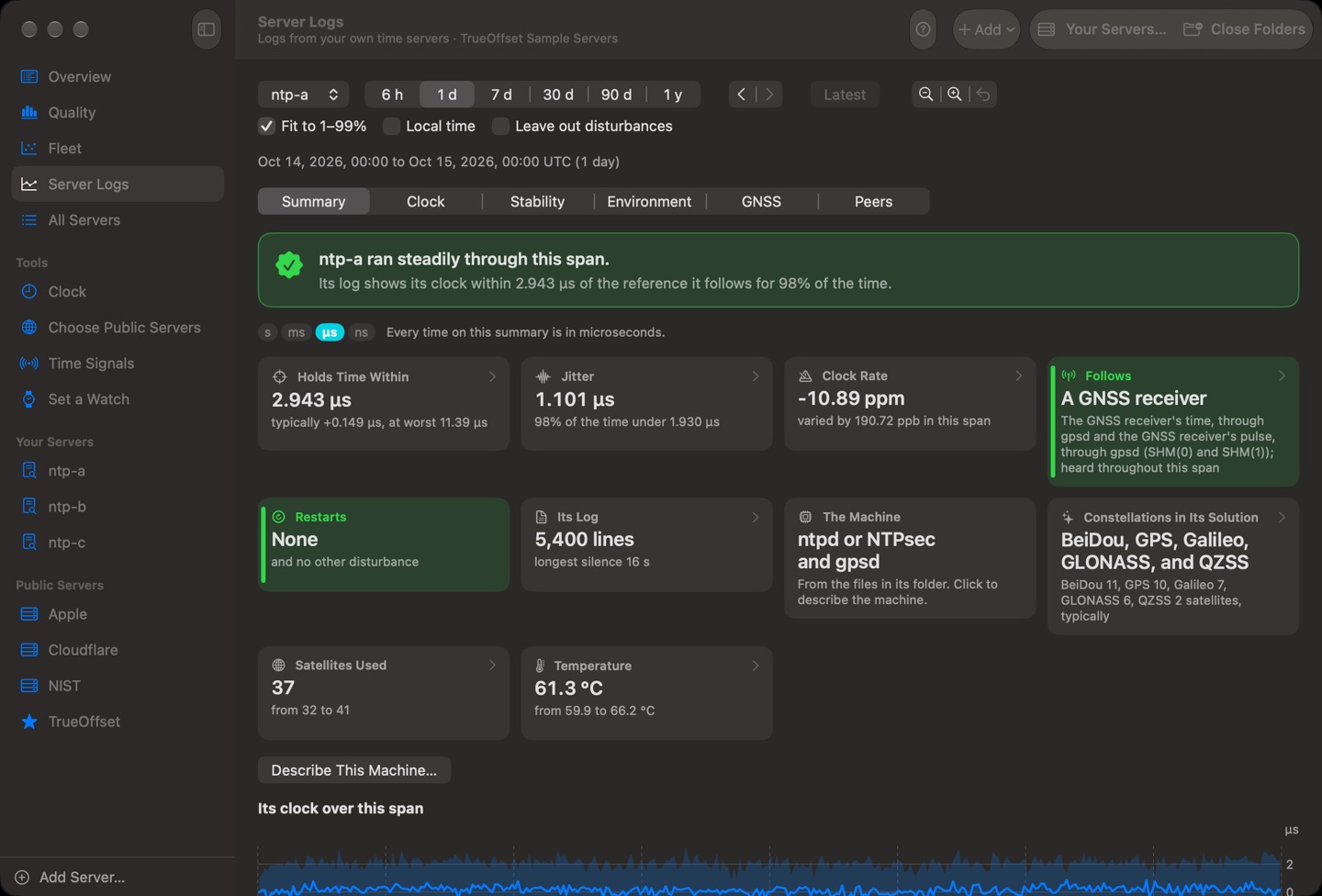
- How the server did, in a sentence, then tiles: holds time within, jitter, clock rate, what it follows, restarts, the machine. Each opens its charts.
- Clock
- Offset from the reference, frequency, local RMS time and frequency jitter.
- Stability
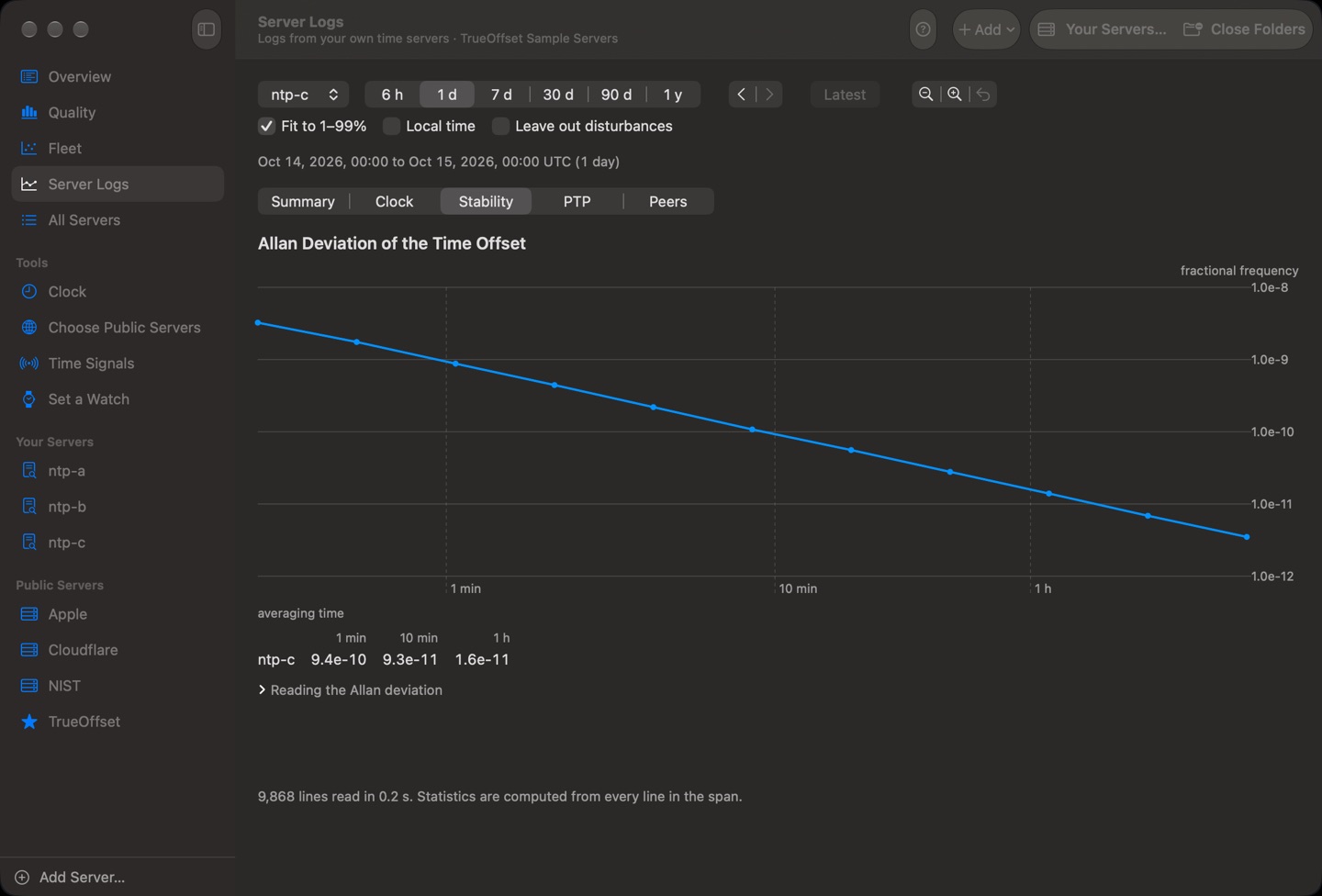
- Allan deviation from seconds to days; for a SecureSync, the oscillator's own curve beside the clock's at hours to days.
- Oscillator
- A SecureSync's own oscillator, hour by hour, in nanoseconds.
- Environment
- Temperatures, and the clock's rate against them.
- PTP
- Offset from the grandmaster, path delay, the card's frequency, and the system clock against the card's.
- GNSS
- Satellites in the solution by constellation, a sky plot, TDOP, and suggestions for the receiver.
- Peers
- Each source's offset, delay, and jitter, with names you can give to addresses.
Statistics
- Holds Time Within is the larger magnitude of the 1st and 99th percentile offsets: where 98% of the span lay. The tile also gives the median offset, as Typical, and the worst. A time within tolerance table answers the specification's question: for each bound, the share of the span inside it and the total time outside.
- Disturbances are found, not averaged in. A silence in the log is usually a restart. A jump without one is a step or a lost reference. A stretch with the reference clock gone is holdover. Each is listed and shaded, and Leave out disturbances takes them out of the charts and statistics.
- Spans of a week or less are read line by line and are exact. Longer ones are drawn from ten-minute summaries of each day kept on the Mac. Extremes, means, and deviations stay exact, but percentiles become estimates, and the app says which.
- Resolution is stated. A log written to the whole microsecond, as a SecureSync's
loopstatsis, is labeled so: the figure is as fine as the log, not as fine as the clock. - The limit. These are the server's judgments of itself. A server can't see an error it shares with its reference, such as a receiver's uncorrected cable delay.
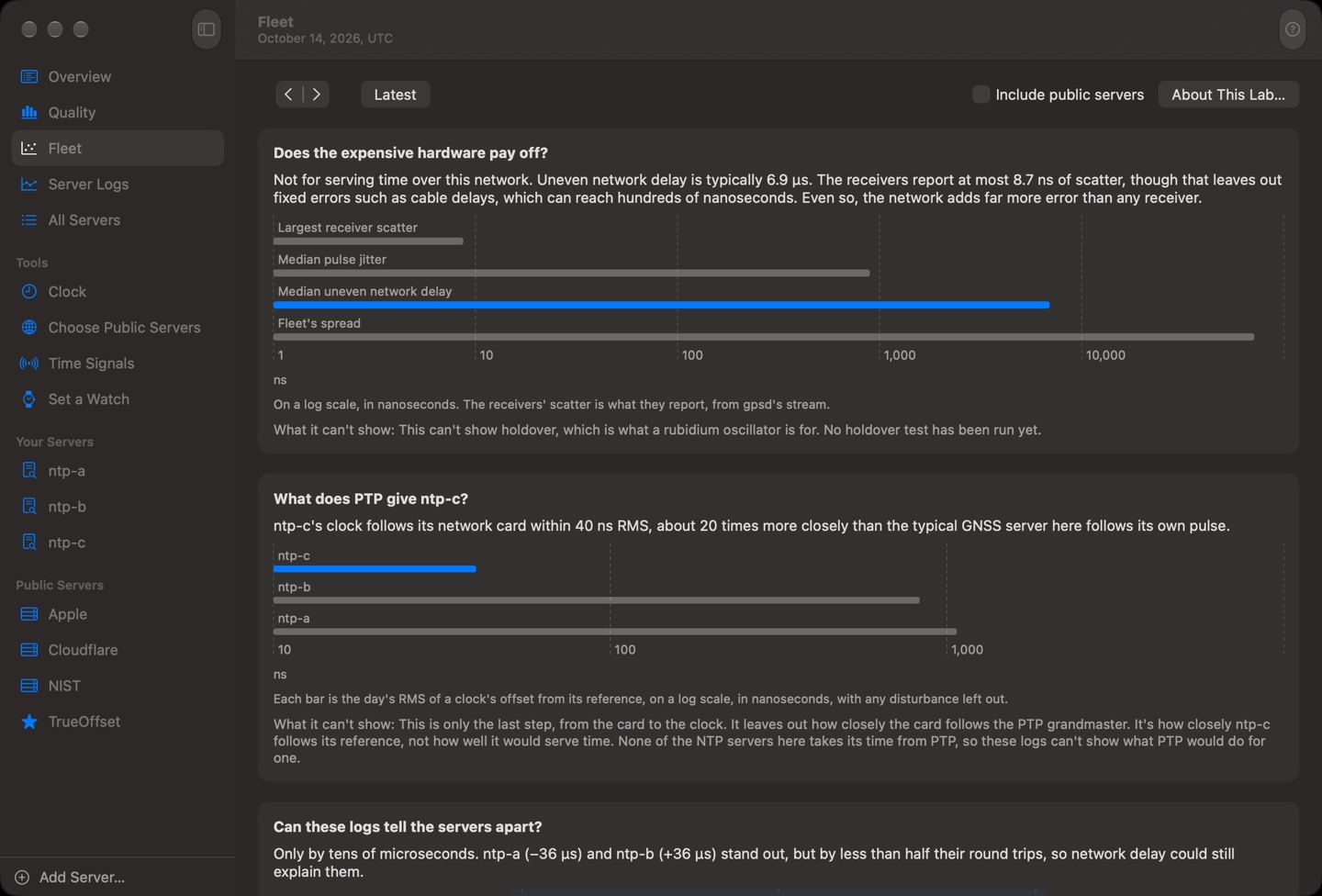
Compare the Fleet
With two or more servers open, a window sets their views of one another side by side for one day. Each row is a server, and each figure is the median offset it logged for the server in that column. Each row shows the fleet from one server's vantage point. Where two servers log each other, half the difference of their figures is how far one clock leads the other with most of the path canceled, by both accounts. Half the sum is the network's share, the uncertainty in the first figure. Beside it, the window shows what each receiver says of itself: satellites in view and used, TDOP, range disagreement.
Between small computers on one switch the network's share is tens of microseconds, so the window can show a server standing apart by that much. It can't tell good receivers apart, which differ by nanoseconds.
Your receiver
For a u-blox receiver the app reads, from gpsd and from read-only ubxtool queries once a day, the module, firmware (TIM or SPG), protocol version, the systems the firmware can track against those in the solution, SBAS for ranging, the antenna cable delay, what the pulse is aligned to, the time mode, and the antenna status. A timing receiver's fixed position is kept too, on your Mac only.
From that come suggestions, each with its reasons, its sources, and the ubxtool commands to copy. The app never runs them.
- Keep to GPS and Galileo. In laboratory time-transfer comparisons they gave the steadiest time. GLONASS's FDMA lets a receiver's delay differ by up to 25 ns between satellites. BeiDou's links were about twice as unsteady.
- Turn off SBAS, as u-blox advises for timing.
- Set the cable delay where it is still the factory 50 ns. Coax is about 4 to 5 ns a meter.
- Change safely: one server at a time,
-Pat the protocol the receiver reports,-p SAVEon an M8, and never a survey, reset, or boot command by accident.
For what we have measured about the receiver, its antenna, and the rest of a time server, see Tuning a time server.
The sky plot is drawn from the satellites' azimuth and elevation, colored by signal strength. Where the receiver holds a fixed position, the app keeps it on your Mac, and never sends it anywhere.


Collecting over SSH
The Mac logs in to each server you add every hour, reads its logs by SFTP, and copies only what they have added since. It writes nothing on the server. It finds the log folders from the daemon's own configuration (statsdir, logdir) before the usual places, and says when the account may not read one, as with chrony's _chrony folder on Debian.
- You choose what the key may do. It can do whatever the account can, read files only by SFTP with no shell, or log in as a
trueoffsetaccount with no password and no shell, chrooted to/var/log. One command, pasted into Terminal, puts the key in place with those permissions. - The key is made once and kept in the Mac's keychain. The server's host key is pinned on first contact, and a changed one stops collection until you have checked its fingerprint.
- Optional, each running exactly the command shown: a description of the machine once a day (board, kernel, PTP-capable ports, time programs and versions, PPS and PHC devices, receiver); the receiver's settings once a day; linuxptp's journal lines; a minute of gpsd each hour.
- Raw files are kept on the Mac for 90 days. The day summaries are kept, so a year still charts. A SecureSync, which keeps five files of each log, loses nothing after the first fetch.
Server setup has the configuration lines, what the key may do, in detail, and what to do when nothing is found.
Advanced
Every device on your own servers
iPhone, iPad, and Apple TV take their time from time.apple.com, and you can't change that on the device. You can on the gateway. A destination NAT rule rewrites every NTP request leaving your network, on UDP port 123, to your own server's address. The device still asks for time.apple.com, and your server responds. We do this at home, with a Destination NAT rule set to Translate on a UniFi gateway.
- Leave your time servers out of the rule. Otherwise their own requests to the servers they follow come back to themselves.
- Leave out the Mac that runs TrueOffset. Otherwise every public server it measures is really yours, and the Overview says they are “answering as one server”. Ours is left out.
- NTS stops working through the rule. Unknown An NTS client gets its keys from the real server over TCP port 4460, then sends its requests to UDP port 123. The rule delivers those to your server, which can't check them, so the client gets no time it can trust. That's what NTS is for. This is reasoning. Our NTS clients use only our own servers, so we haven't seen it happen.
- IPv6 needs its own rule. Unknown Apple's devices use IPv6 where the network has it, and a rule for IPv4 alone leaves them on Apple's servers. Our rule is set up to cover IPv6 as well. We haven't yet checked it from a device behind it.
To check a device, ask a server whose reply you know. On a Mac, sntp -d prints the stratum and reference in the reply. From outside a redirect, NIST's server reports stratum 1 and the reference “NIST”. From inside one, you see your own server's, such as “PPS” or “GPS”.
sntp -d time.nist.gov | grep -E 'stratum|ref:'The last leap second
On October 15, 2026, the General Conference on Weights and Measures decided that UTC becomes continuous on May 20, 2027 (Resolution 5). From then on it may drift up to an hour from the Earth's rotation, which keeps it continuous for several centuries. The Earth has lately been turning faster, and the chance of the first negative leap second, one taken away, was put at about 30% by 2035. No system has ever had to handle one.
The IERS has ruled out a leap second at the end of December 2026 (Bulletin C 72), and the next chance, the end of June 2027, comes after UTC becomes continuous. So the leap second at the end of 2016 was the 27th and the last. TAI stays 37 seconds ahead of UTC, and GPS time 18 seconds ahead, for centuries. The app's Help explains the time scales, and what smearing and the leap indicator did while leap seconds lasted.
Time signals, timed
Fourteen signals are synthesized sample by sample so that each pip starts on the reference server's second, not the device's. The app sends each pip early by the output's reported latency. On iPhone, iPad, and Mac a measured latency can replace it: test tones every third second, heard by the microphone and timed against the reference, kept once three agree within 3 ms, for each output separately.
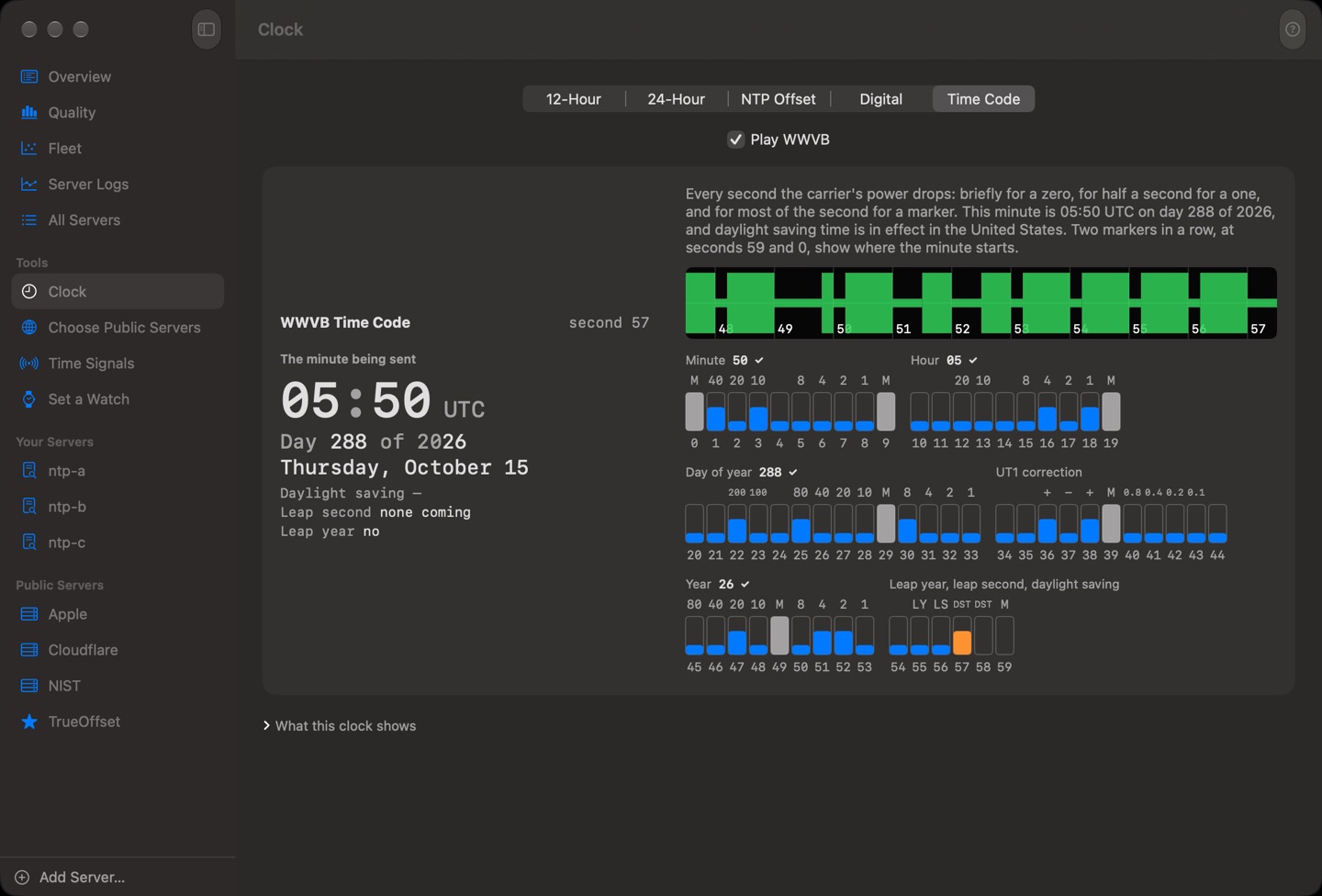
Long-wave carriers are played at a hundredth of their frequency with their modulation intact, and the codes of VNG, WWVB, DCF77, MSF, JJY, BPC, WWV and WWVH, and CHU are decoded on screen as they are sent. Radio-controlled watch setting (beta) plays a third or a fifth of the carrier at full level, so that a harmonic lands on the real frequency. DCF77's weather seconds can carry a local forecast in Meteotime's fields, unenciphered, as a demonstration.
Help test what's next
New features for server operators reach TestFlight first. Join the beta to preview them, test them against your own servers, and tell us what you find. To send feedback, open TrueOffset in TestFlight and choose Send Beta Feedback.
Join the beta on TestFlightBuilt with
The iPhone, iPad, and Apple TV apps have no external libraries. The Mac app reaches servers with the Mac's own OpenSSH and stores its history with one library, GRDB, the SQLite toolkit by Gwendal Roué, used under the MIT License. The statistics follow ntpviz, but none of its code is used. Much of this was learned from the time-nuts.
On the servers it reads. Your servers do the timekeeping, with open-source software the apps don't include. The Mac app reads what these programs write, and its read-only switches run some of their tools: ntpd and NTPsec (their statistics files, and NTPsec's ntploggps and ntplogtemp), chrony (its logs), gpsd (gpspipe, ubxtool and gpsctl; Position Wander follows its gpsprof), linuxptp (ptp4l, phc2sys, ts2phc and pmc), ethtool, util-linux's hwclock, systemd's journal, and OpenSSH on the server.
Questions, corrections, and logs that will not parse: [email protected].